
In short
What this article says
When an Android app is open source, an AI agent can handle the engineering from a simple request: clone it, change it, build the APK, install it on a USB-connected phone, inspect the screen, and iterate. The article shows the real short prompts behind tg-digest-android.
- The example fork adds a Digest tab that combines unread posts from selected Telegram channels into one chronological feed.
- Claude built, installed, opened, visually checked, and iterated on the app on a physical Redmi Note 8 Pro in one day.
- The reader must obtain a personal Telegram api_id and api_hash, place them in root local.properties, and enable Android developer options and USB debugging.
- At publication time, the author’s personal Telegram credentials appeared neither in the public tree nor in either public commit; only Telegram’s upstream sample pair remained in the imported source.
- The supplied build is arm64-v8a and is based on Telegram for Android 12.7.3 (6750).
The surprising part is not that a Telegram fork gained a Digest tab. It is that getting it onto a real phone did not require me to write an Android build plan. I described the missing behavior in ordinary language, connected the phone, later wrote only “Run the latest version on my phone” — and used my own build that evening.
That morning, the feature did not exist
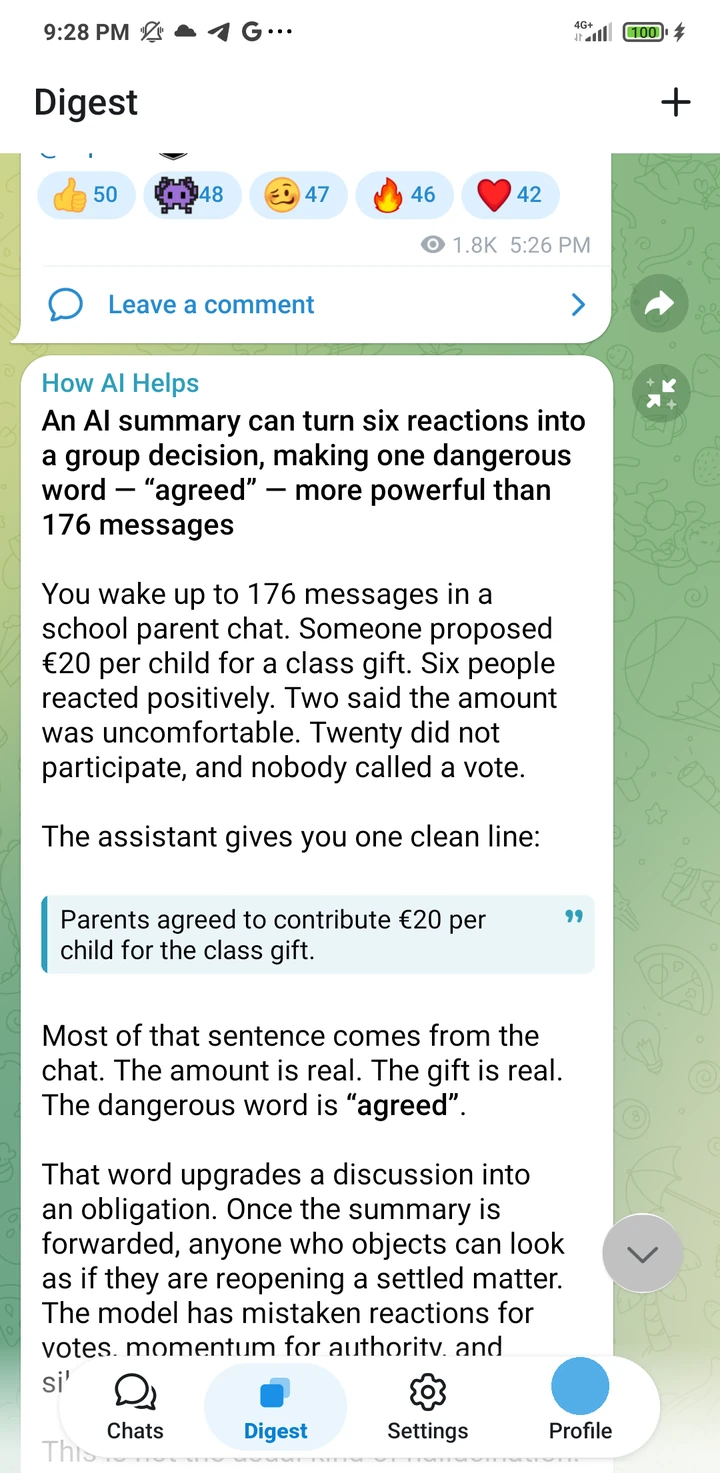
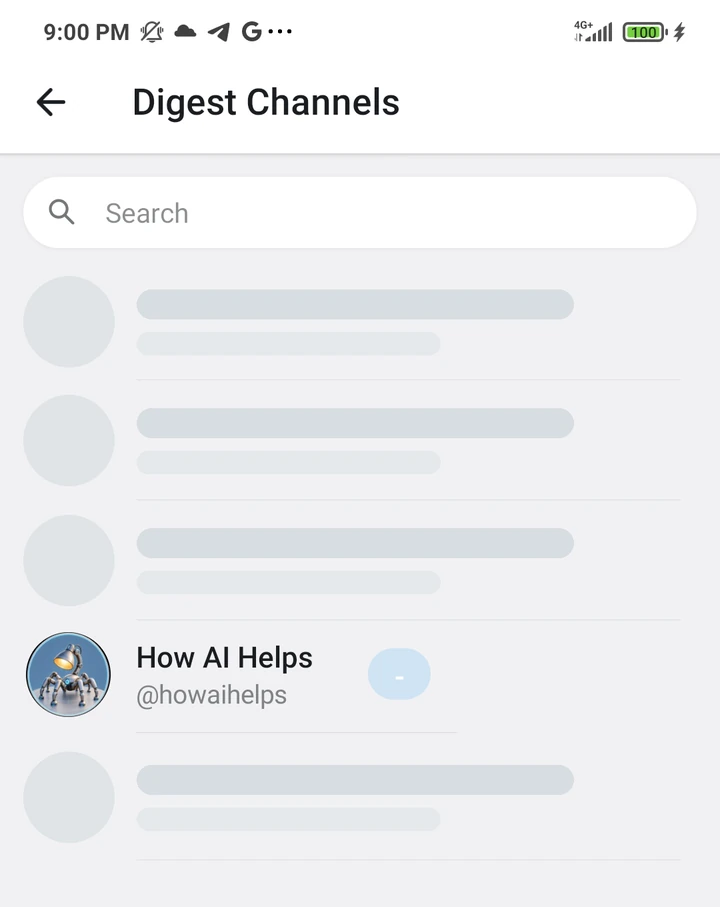
Channel subscriptions tend to end in one of two equally bad states: hundreds of red counters, or everything marked read while useful posts disappear. I wanted a third model: choose a handful of channels myself, then read all their unread posts as one ordinary timeline.
The resulting Digest tab does exactly that:
- it lets you search for channels and combines their posts chronologically;
- it keeps a separate last-read boundary for every account;
- it opens at the first unread item and scrolls infinitely into the past;
- it renders channel names, media albums, dates, and reactions with Telegram’s own UI;
- it marks visible messages read through the same path as a normal channel screen.
This is not a tiny demo or a new client drawn from scratch. The agent had to move the base to the latest published Telegram source, understand its local database, pagination, media grouping, and navigation. But I did not have to dictate class names. I described what the person using it should see and feel.
The work was engineering. The prompt was ordinary language
The core request looked roughly like this. The final sentence mattered: it stopped the agent from building a second, visibly foreign interface beside Telegram’s existing one.
Add a separate page containing all unread messages from Telegram channels I select.

I need a channel picker. Keep a separate Digest watermark for the last item I actually read. When the page opens, position it at the first unread message. Add infinite scrolling into the past and a bottom button that returns to the first unread item. Mark visible posts read through Telegram’s standard read state.

Render albums, the channel name, and its avatar the same way normal Telegram does. Reuse the existing UI as much as possible; write custom UI only where unavoidable.

Build the app, install it on the connected phone, and verify the result on the device.
A few hours later, the app was running on a Redmi Note 8 Pro. I then gave two short follow-ups: remove the scroll jitter, and move the round button above the bottom navigation while removing a stray avatar between messages. Claude inspected the result on the phone, found the causes, rebuilt the APK, and checked again. This felt more like working with a product team than “generating code.”
Code is getting cheaper; precise intent is getting more valuable
There used to be an expensive chain between “I need this” and “I use this”: find an Android developer, explain the architecture, assemble the environment, wait for builds, and learn ADB. That trained us to treat an app’s interface as final. We accept what the vendor ships and wait for the next version.
A coding agent changes the economics of that chain. It can read a large unfamiliar repository,
match JDK, SDK, and NDK versions, locate the right integration point, build an APK, inspect an
installation failure, read logcat, and repeat. Not every result is good, but the cost of
a first working version has collapsed.
This does not apply to everything. A closed app with no source, server-side capability, payment infrastructure, or a cryptographic protocol change will not appear from one prompt. But when the desired behavior lives inside an open Android client and can be checked on screen, waiting for the official button is no longer always rational.
How to repeat it: leave only the necessary actions to the human
The workflow below is for this fork. You need a computer, a terminal-capable coding agent such as Claude Code or Codex, an Android phone, a USB data cable, and several gigabytes of free space. The repository is large, and the first Android build takes time. Let the agent prepare the technical environment; you will add private credentials, change phone settings, and sign in to Telegram.
1 Let the agent prepare the project
Open the agent in an empty folder. The original project began with a similarly short request: fork the official Android client and run it on the connected phone. For the finished public fork, use:
Clone https://github.com/howaihelps/tg-digest-android and run the latest version on my Android phone connected over USB.

Tell me when I need to enter my own Telegram app id and app hash or approve something on the phone. Do not show or commit those credentials.
2 Obtain your own Telegram API ID and hash
Human action
- Sign in through an official Telegram app if you do not already have an account.
- Open my.telegram.org, sign in with your phone number, and choose API development tools.
- Complete the application form, choose Android, and save the issued
api_idandapi_hash.
This is not a bot token. Telegram issues one pair per phone number and requires a personal ID for a third-party client. See Telegram’s official instructions.
At the cloned repository root, beside settings.gradle, open local.properties and replace the placeholders manually. Do not add quotes:
sdk.dir=/Users/[YOUR_NAME]/Library/Android/sdk
TELEGRAM_API_ID=[YOUR_NUMERIC_API_ID]
TELEGRAM_API_HASH=[YOUR_32_CHARACTER_API_HASH]
The sdk.dir path differs on Windows and Linux; the agent should already have filled it.
In this fork, TMessagesProj/build.gradle injects the two values into BuildConfig, and BuildVars.java reads them at runtime. local.properties is listed in .gitignore.
At publication time, I also compared my real values against every file in both public commits: my personal api_id and api_hash are absent from both the current tree and Git history. The imported upstream source does contain Telegram’s standard restricted sample pair. Those are not my credentials, and you must not rely on them for your build.
3 Prepare the phone
Human action
- Open About phone and tap Build number seven times. On Xiaomi, this may be called MIUI version or HyperOS version.
- Return to Settings, open Developer options, and enable USB debugging.
- On Xiaomi, also enable Install via USB; some models require USB debugging (Security settings).
- Connect the unlocked phone with a cable that supports data, not charging only.
- Approve the computer’s RSA fingerprint on the phone; “Always allow” is convenient.
Menu names vary by manufacturer. The basic sequence is documented in the official Android developer-options guide. Keep the screen unlocked during the first installation: an agent cannot approve a system dialog for you.
4 Ask the agent to build and launch
Once local.properties is complete and the phone is connected, you do not need to name ADB,
the Gradle task, the ABI, CMake, an APK path, or an Android activity. In the real Claude session, my
whole launch request was:
Run the latest version on my phone.Claude then checked the connected device, reconciled the Android toolchain, built the correct
variant, installed it, launched it, and inspected screenshots. Those were the agent’s actions, not
technical knowledge hidden inside my prompt. The result was a roughly 75 MB debug APK running as org.telegram.messenger.beta on arm64-v8a. You still need to sign in yourself
and enter the login code and two-factor password if enabled. Do not give those to the agent.
5 Request your feature in the language of outcomes
After the app launches, you can change this fork or repeat the process with another open-source app. Do not start with “create a class” or “fix the RecyclerView.” Describe the situation, observable behavior, and acceptance criteria.
Change the app for this personal workflow.

Right now: [what is missing or what I do manually].
I want: [what I should see and what should happen].
Keep: [the existing screens and behavior that must not change].

Reuse the app’s own interface as much as possible. Make it work, run the latest version on my connected phone, and check the result yourself.
6 Debug the feel, not just the compilation
The first Digest build worked, but the feed twitched slightly while loading more items. The next prompt contained neither a diagnosis nor a test plan. It was just what I could see on the phone:
Everything is great, but the screen twitches while scrolling. Can you check it yourself and fix it?The agent found a full list refresh during pagination and replaced it with an incremental update. In the repeated measurement, janky frames fell from 11.9% to 2.1%, while the 99th-percentile frame time fell from 40 to 22 ms. I described another visual defect even more simply: “move the button above bottom navigation and remove the artifact in the center, while preserving the channel name.” That request was also ordinary language, not a UI specification. The final compromise is a name-only header: the sender avatar that caused the artifact is not rendered. This loop — look, name the defect, let the agent reproduce it, then verify — matters more than a perfect first prompt.
Before publishing, use a separate security prompt
A working APK does not make a safe repository. My actual publication request stated the boundary in plain language. Claude translated it into checks of tracked files and history before pushing:
Push all changes to the public repository in one good English commit.

Under no circumstances push my app id or app hash. They must stay in a local file that is not included in the repository. Check this carefully before you push.
Telegram for Android is distributed under GNU GPL v2 or later, so the fork keeps the license and source available. There is also a practical obligation: maintain your fork, review its diff, and do not treat generated code as automatically trustworthy. An agent radically reduces the cost of implementation; it does not remove the owner’s responsibility.
Not an app for everyone — an app exactly for you
A mass-market product must choose features that make sense for millions. A personal build can be strange, narrow, and perfect for one person. This is where agents change software most: you do not have to found a startup or wait years for a feature-request vote. Sometimes an open repository, a precise description, a USB cable, and a willingness to inspect the result are enough.
Code did not become useless. It became much less scarce. The right to take it, change it, and run it on your own device became correspondingly more valuable.
The short route
- Choose open Android source and let an agent prepare the toolchain.
- Obtain private credentials yourself and save them only in a local ignored file.
- Enable Developer options and USB debugging, then connect an unlocked phone.
- Have the agent build, install, launch, and verify the APK.
- Describe the behavior you want in ordinary language.
- Iterate on a real device, then audit secrets and licensing separately before any push.
Quick FAQ
Can a non-developer really modify an Android app with an AI agent?
Yes, when the source is available and the task can be verified on a device. You still need to describe the desired behavior, approve sensitive actions, provide private credentials locally, and test the result; the agent can handle most repository, toolchain, build, install, and debugging work.
Where do Telegram api_id and api_hash go in this fork?
Create local.properties in the repository root and add TELEGRAM_API_ID and TELEGRAM_API_HASH without quotes. The file is ignored by Git; Gradle injects the values into BuildConfig at build time.
What must I do on the Android phone?
Enable Developer options by tapping Build number seven times, enable USB debugging, connect an unlocked phone with a data cable, and approve the computer’s RSA fingerprint. Xiaomi devices may also require Install via USB.